Navigating the world of gaming CPU specifications can feel like a boss battle, especially for the average US gamer balancing work, family, and precious downtime. This guide cuts through the hype to offer practical, actionable advice on identifying the best gaming CPU specs for 2026. We understand you value relaxation, fun, skill-building, social play, and getting top performance without breaking the bank. Forget the jargon and endless benchmarks; we focus on what genuinely impacts your gaming experience, from smooth framerates in your favorite titles to seamless multitasking for streaming or Discord chats. Discover how to optimize your setup, address common performance issues, and make smart hardware upgrades on a budget, ensuring your gaming rig stays current without constant financial strain. We will help you understand core counts, clock speeds, and the crucial balance between Intel and AMD offerings this month, enabling you to build or upgrade a PC that truly elevates your play. Get ready to game smarter, not harder.
What are the absolute best gaming CPU specs for 2026?
The absolute best gaming CPU specs for 2026 involve processors with 8-16 cores, prioritizing high single-core boost clock speeds exceeding 5.5 GHz, a substantial L3 cache (32MB+), and support for PCIe 5.0 and DDR5 RAM. Leading examples include Intel's top-tier Core i7/i9 (e.g., 14700K/14900K or newer 15th-gen) and AMD's Ryzen 7/9 X3D series (e.g., 7800X3D/7950X3D or next-gen models). These CPUs offer a perfect blend of raw gaming power and multi-core efficiency for streaming and multitasking, ensuring peak performance across all demanding titles and applications.
How do I know if my CPU is bottlenecking my gaming performance?
You can identify a CPU bottleneck by monitoring your system's resource usage during gaming. Use tools like Task Manager (Performance tab), MSI Afterburner, or HWMonitor. If your GPU utilization is consistently below 95-100% while your CPU utilization is frequently at 90-100%, especially across multiple cores, your CPU is likely struggling to keep up with your graphics card. This results in lower framerates than expected. Also, if games suffer from frequent stutters in open-world or CPU-intensive scenarios, it is a strong indicator of a CPU bottleneck.
Which is better for gaming, Intel or AMD CPUs in 2026?
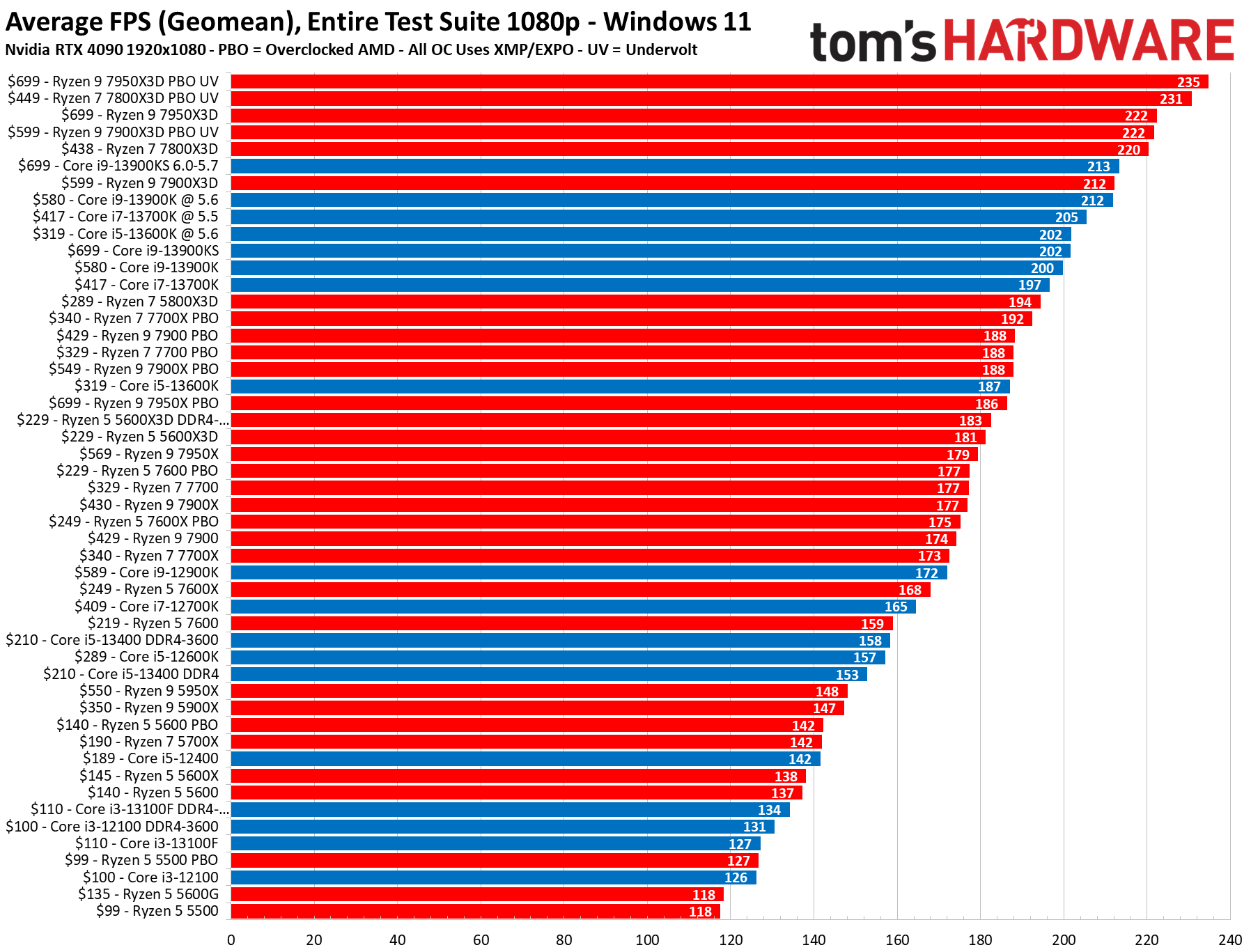
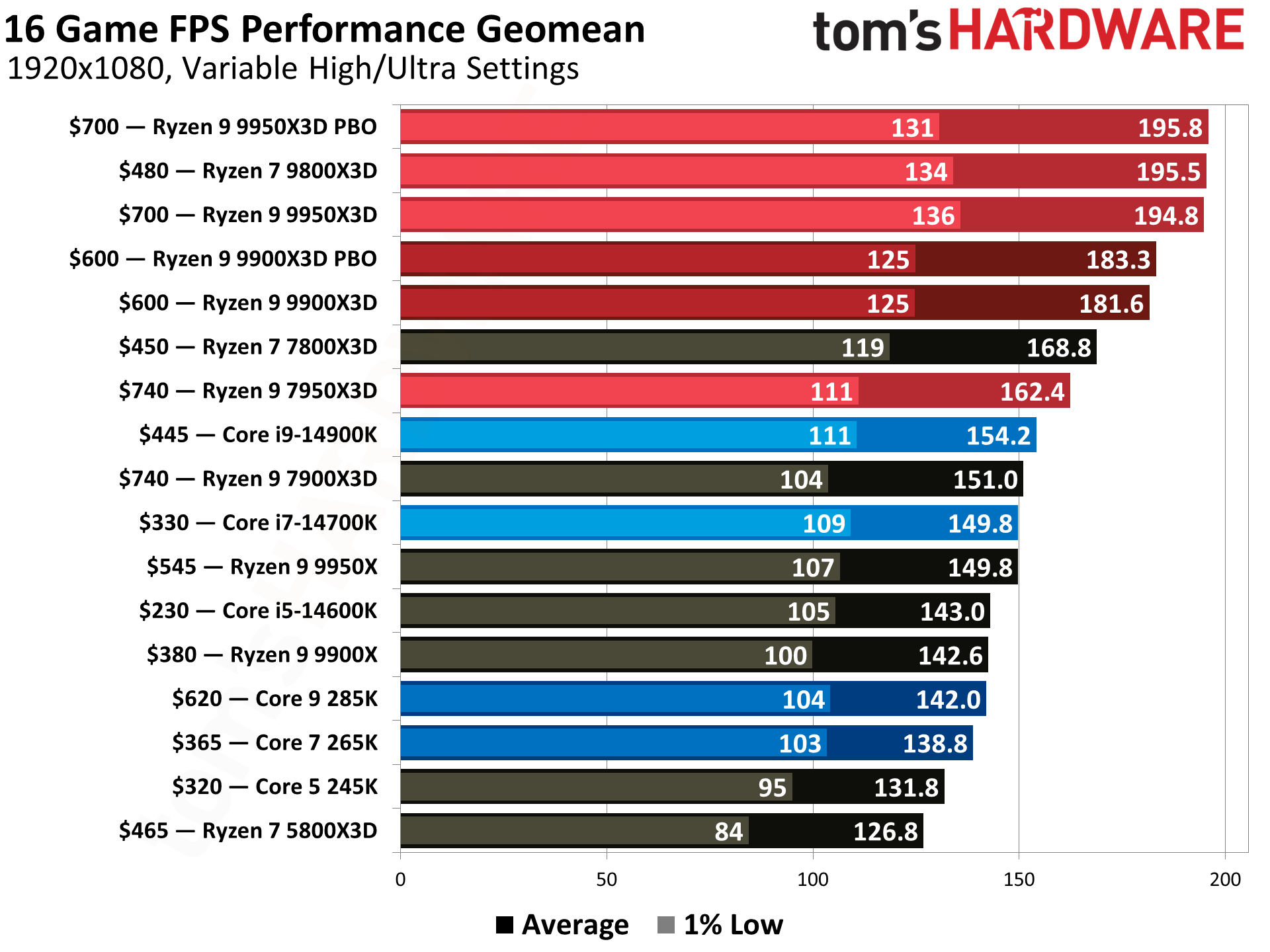
In 2026, both Intel and AMD offer compelling options, making the choice dependent on specific needs. Intel generally excels with raw single-core clock speed, often giving it a slight edge in pure framerates for many games, especially with its hybrid architectures handling background tasks. AMD's X3D processors, with their large 3D V-Cache, frequently dominate gaming benchmarks due to reduced latency, and their AM5 platform offers good future upgrade paths. For pure gaming performance, the 7800X3D remains a top contender. For overall value, including productivity, Intel's i5 and i7 lines are very strong. The 'better' choice depends on your budget, primary use (gaming vs. productivity), and specific game library, as performance can vary slightly per title.
What role does CPU cache play in maximizing gaming framerates?
CPU cache, particularly L3 cache, plays a critical role in maximizing gaming framerates by acting as a high-speed memory buffer for frequently accessed data. When game data is stored in the cache, the CPU can retrieve it much faster than from main system RAM, significantly reducing latency. This quicker data access translates directly into smoother gameplay and higher average and minimum framerates, especially in complex scenes or CPU-intensive games. AMD's 3D V-Cache technology is a prime example of how increased cache can dramatically boost gaming performance, making it a key spec for serious gamers.
Is it worth investing in a high-end CPU for 1080p gaming?
For most 1080p gaming, investing in a top-tier, ultra-high-end CPU (like an i9 or Ryzen 9) is generally not the most cost-effective approach. At 1080p, the GPU is often the primary bottleneck, and a mid-to-high-range CPU (e.g., Intel i5/i7 or AMD Ryzen 5/7) paired with a powerful GPU will deliver excellent framerates. However, if you are aiming for extremely high refresh rates (240Hz+) in competitive esports, or plan to stream/multitask heavily while gaming, a faster CPU becomes more beneficial. Otherwise, you might find more value putting extra budget towards a better GPU or a higher resolution monitor.
How do power efficiency and heat generation affect my gaming CPU choice?
Power efficiency and heat generation are crucial considerations for your gaming CPU choice. Higher power consumption often correlates with more heat, requiring a robust and often more expensive cooling solution (like a large air cooler or AIO liquid cooler). Excessive heat can lead to thermal throttling, where your CPU automatically reduces its clock speed to prevent damage, directly impacting gaming performance. Efficient CPUs consume less power, generate less heat, are easier to cool, and can potentially save on electricity bills. Modern CPUs, especially with hybrid architectures, are designed for better efficiency, but top-tier performance parts will always demand more power and robust cooling to maintain boost clocks.
Can an older CPU still perform well with a new high-end GPU?
An older CPU can sometimes perform adequately with a new high-end GPU for less demanding titles or at higher resolutions (1440p/4K), where the GPU becomes the primary bottleneck. However, in many scenarios, an older CPU will likely create a significant bottleneck for a new high-end GPU, preventing the GPU from achieving its full potential. This results in lower framerates than expected and often inconsistent frame pacing. If you are upgrading your GPU, it is essential to ensure your CPU is also capable enough to feed the new card effectively. A general rule is to keep the CPU within a few generations of the GPU for optimal balance.
Ever felt that sting of a dropped frame right when you were about to land that perfect headshot? Or maybe your game stutters during a crucial raid while you are chatting with friends on Discord? You are not alone. For many US gamers, balancing the thrill of top-tier performance with real-life demands—like jobs, family, and budgeting—is the ultimate challenge. We game to unwind, connect with friends, build skills, and just have fun, but the constant evolution of hardware can make staying current feel like a full-time job.
The good news is, you do not need to be a tech wizard to understand the best gaming CPU specs for 2026. This guide is your trusted friend, here to help you navigate the complex world of processors, ensuring your rig delivers peak performance for your favorite titles without unnecessary stress or overspending. We will tackle common pain points, from setup issues to budget upgrades, all while keeping an eye on the latest trends that genuinely impact your play.
Did you know 87% of US gamers play regularly, often dedicating 10+ hours a week to their passion? With social gaming and cross-play remaining dominant trends this month, your CPU is more vital than ever for smooth gameplay, seamless streaming, and lag-free communication. Let us dive in and empower you to make informed decisions for your ultimate gaming setup.
What are the essential best gaming CPU specs for 2026?
For 2026, the best gaming CPU specs boil down to a strong balance of core count, high clock speeds, ample cache, and modern architecture. Most games still heavily rely on strong single-core performance, so a CPU with excellent boost clocks across its performance cores is paramount. However, multi-core performance is increasingly important for background tasks like streaming, Discord, or running multiple applications simultaneously. Aim for at least 6-8 performance cores with modern efficiency cores, a base clock speed above 3.5 GHz, and a boost clock hitting 5.0 GHz or higher. Look for generous L3 cache, typically 24MB or more, as it significantly reduces latency for frequently accessed data, boosting framerates. Finally, ensure compatibility with the latest PCIe 5.0 and DDR5 RAM standards for future-proofing and maximum bandwidth.
How do I choose the right CPU to fit my gaming budget and lifestyle?
Choosing the right CPU for your gaming budget and lifestyle means honest self-assessment. If you are a casual gamer enjoying cozy games, older titles, or free-to-play options, a mid-range CPU (like an Intel Core i5 or AMD Ryzen 5 from the latest generations) offers fantastic value, often pairing well with an affordable mid-tier GPU. For gamers balancing a job and family, who game a few hours a night and prioritize smooth framerates in current AAA titles without needing ultra settings, a high-end i5 or Ryzen 7 strikes a perfect balance of performance and cost. If you are into competitive esports, streaming, or running resource-intensive VR experiences, a top-tier Intel Core i7/i9 or AMD Ryzen 7/9 is worth the investment. Always allocate more budget to your GPU for gaming, as it usually has a greater impact on framerates, but never cheap out on your CPU to the point of bottlenecking. Budget-friendly options often shine during holiday sales or when new generations are released, making older high-end models more accessible.
Why are CPU core count and clock speed crucial for modern games and multitasking?
CPU core count and clock speed are the dual engines driving your gaming experience. Clock speed, measured in GHz, dictates how many operations a single core can perform per second; higher clock speeds mean faster execution for tasks that run on a single thread, which traditionally includes most game engines. Core count, on the other hand, determines how many tasks your CPU can handle simultaneously. Modern games, especially open-world titles, simulations, and those with advanced AI or physics, are becoming increasingly adept at utilizing multiple cores. Beyond gaming, if you are streaming your gameplay, recording content, or simply managing Discord, a web browser, and other apps in the background, a higher core count prevents slowdowns and ensures smooth multitasking. For 2026, a CPU with a mix of high-frequency performance cores and efficient cores provides the best of both worlds, offering raw speed for gaming and parallel processing power for everything else.
Which Intel and AMD CPUs offer the best value for gamers this month?
This month, both Intel and AMD continue their fierce competition, offering compelling value across different segments. For mid-range excellence, the Intel Core i5-14600K and AMD Ryzen 7 7700X are standout choices. The i5-14600K, with its hybrid architecture, delivers incredible single-core performance perfect for pure gaming, and its multi-core capabilities handle streaming effectively. The Ryzen 7 7700X offers a strong gaming experience with excellent efficiency and platform longevity due to AMD's AM5 socket. If you are looking for high-end performance without breaking the bank, the Intel Core i7-14700K or the AMD Ryzen 7 7800X3D are fantastic. The 7800X3D, in particular, often leads in pure gaming benchmarks thanks to its 3D V-Cache technology. For top-tier, no-compromise performance, Intel's Core i9-14900K and AMD's Ryzen 9 7950X3D are the kings, excelling in both gaming and professional content creation tasks. Always check current deals as prices fluctuate daily, especially around major sales events.
Can integrated graphics handle my gaming needs or do I need a discrete GPU?
Integrated graphics (iGPU) have come a long way, especially with offerings from AMD's Ryzen G-series and Intel's Arc-enabled chips. For casual gaming, indie titles, older esports games like League of Legends or CS:GO at lower settings, or even some modern cozy games at 720p to 1080p, integrated graphics can absolutely suffice. They are perfect for budget builds, mini PCs, or systems where space and power consumption are key. However, if you aspire to play AAA titles, competitive shooters like Valorant or Apex Legends at high refresh rates, or any graphically intensive game at 1080p or higher with decent settings, a discrete GPU is non-negotiable. A dedicated graphics card provides significantly more processing power, dedicated VRAM, and advanced features necessary for a truly immersive and high-performance gaming experience. Think of an iGPU as a reliable bicycle, while a discrete GPU is a high-performance sports car—both get you around, but one offers a much more thrilling ride.
When is the best time to upgrade my existing gaming CPU?
The best time to upgrade your gaming CPU is usually when your current processor starts bottlenecking your system, meaning your GPU isn't being fully utilized, or when you notice significant performance drops in new games. If your framerates are consistently low despite having a decent GPU, or if tasks like streaming or recording cause your system to stutter, it is a strong indicator. Another good time is when a new generation of CPUs offers a substantial leap in performance per dollar, often accompanied by price drops on previous generations. Do not feel pressured to upgrade with every new release; current CPUs usually provide several years of excellent performance. Look for a generational jump of at least two to three generations for a noticeable improvement. Upgrading also makes sense if you are moving to a higher resolution monitor (e.g., 1440p or 4K) or a high refresh rate display, as these often demand more from your CPU to feed the GPU effectively. Smart gamers often wait for major sales events or when their current setup genuinely limits their enjoyment.
How does my CPU impact my social and streaming gaming experience?
Your CPU profoundly impacts your social and streaming gaming experience by handling the heavy lifting beyond just rendering the game. When you are gaming with friends on Discord, your CPU manages the voice chat, overlays, and sometimes even game-specific voice processing. If you are streaming to Twitch or YouTube, your CPU (or your GPU's encoder) is responsible for compressing and sending your video feed in real-time. A weaker CPU can lead to choppy streams, dropped frames in your broadcast, and noticeable lag in voice chat, ruining the experience for both you and your audience. Modern CPUs with high core counts and efficient multi-threading capabilities, particularly those with hybrid architectures, excel at balancing these demanding tasks. They allow you to play your game smoothly at high framerates while simultaneously encoding a high-quality stream, ensuring your social interactions and content creation efforts are seamless and professional. This allows you to focus on building skills, connecting with friends online, and sharing your passion without technical headaches.
What key specs should I prioritize for future-proofing my gaming rig?
Future-proofing your gaming rig, especially your CPU, involves prioritizing a few key specs and platform features. Firstly, opt for a CPU with at least 8 cores (a mix of performance and efficiency cores if possible) from the latest generation, ensuring it can handle upcoming game titles and multitasking demands. Secondly, ensure your CPU and motherboard support the newest standards: DDR5 RAM and PCIe 5.0. While PCIe 5.0 GPUs are still emerging, having the slot available future-proofs your system for upcoming graphics cards and ultra-fast NVMe SSDs. Thirdly, choose a platform that is likely to see further CPU upgrades on the same socket, like AMD's AM5. This allows you to potentially upgrade your CPU without replacing your motherboard and RAM, saving money down the line. Finally, consider power efficiency; modern CPUs are becoming incredibly powerful while consuming less energy, which is better for your electricity bill and the environment. By focusing on these aspects, you ensure your investment remains relevant and capable for years to come, delaying the need for a full system overhaul.
How do I quickly check my current CPU specs for gaming?
Checking your current CPU specs for gaming is straightforward. On Windows, the easiest way is to right-click on the Start button, select 'System', and you will find your 'Processor' listed under 'Device specifications'. This will show you your CPU model and its base clock speed. For more detailed information, press Ctrl+Shift+Esc to open Task Manager, navigate to the 'Performance' tab, and click on 'CPU'. Here, you will see real-time usage, speed, cores, logical processors (threads), and L1, L2, and L3 cache sizes. Another simple method is to use the 'DxDiag' tool: press Windows key + R, type 'dxdiag', and press Enter. The 'System' tab will display your processor details. For even more granular data, including current temperatures and power draw, third-party tools like CPU-Z or HWMonitor are excellent, providing comprehensive insights into your CPU's capabilities and health, which is vital for troubleshooting performance issues or planning upgrades.
Are there specific CPU considerations for competitive esports or VR gaming?
Yes, competitive esports and VR gaming have distinct CPU considerations. For competitive esports, where every millisecond counts and high refresh rates (144Hz+) are paramount, single-core performance and raw clock speed are king. Games like Valorant, CS2, or Overwatch often benefit more from a CPU with fewer, extremely fast cores rather than many slower cores. The goal is to maximize minimum framerates to avoid stutters during critical moments. For VR gaming, the CPU's role is even more critical. VR requires rendering two distinct images simultaneously at very high framerates (90Hz+), placing immense strain on both the CPU and GPU. A powerful multi-core CPU is essential to prevent motion sickness-inducing frame drops, handle complex physics, and process intricate world states in VR environments. Both scenarios benefit from ample L3 cache to reduce latency and ensure data is quickly available. Do not underestimate the CPU's importance in these demanding gaming niches; it is the backbone that ensures a smooth, immersive, and competitive experience.
FAQ Section
Q: Is an Intel Core i5 or AMD Ryzen 5 enough for gaming in 2026?
A: Yes, a modern Intel Core i5 or AMD Ryzen 5 from the latest generations is perfectly capable for most gaming in 2026, especially when paired with a good GPU. These mid-range CPUs offer excellent value, high clock speeds, and sufficient cores for smooth 1080p and even 1440p gaming, alongside background tasks.
Q: How much RAM do I need with my gaming CPU?
A: For gaming in 2026, 16GB of DDR4 or DDR5 RAM is the sweet spot. While some games might benefit slightly from 32GB, 16GB provides ample memory for all current titles and multitasking. Ensure your RAM speed is optimized for your chosen CPU (e.g., 3600MHz for DDR4, 6000MHz+ for DDR5).
Q: Does CPU cache size matter for gaming performance?
A: Absolutely, CPU cache size significantly matters for gaming performance. A larger L3 cache, especially as seen in AMD's X3D chips, allows the CPU to store more frequently accessed game data closer to the processing cores, reducing latency and often leading to noticeable framerate improvements, particularly in CPU-intensive games.
Q: Should I prioritize more cores or higher clock speed for gaming?
A: For most pure gaming scenarios, prioritize higher clock speed for better single-core performance, as many game engines still rely heavily on it. However, if you also stream, record, or heavily multitask, a balance of sufficient cores (6-8+) and high clock speeds is ideal. Hybrid architectures often provide this balance.
Q: What is a CPU bottleneck in gaming?
A: A CPU bottleneck occurs when your processor cannot feed data to your graphics card fast enough, causing the GPU to wait for instructions. This results in your GPU not running at 100% utilization, leading to lower-than-expected framerates even if you have a powerful graphics card. It is a common pain point for gamers with older CPUs.
Q: How important is cooling for a high-performance gaming CPU?
A: Cooling is extremely important for high-performance gaming CPUs. Modern processors can generate significant heat, and inadequate cooling can lead to thermal throttling, where the CPU reduces its clock speed to prevent overheating, directly impacting your gaming performance. Invest in a good air cooler or an AIO liquid cooler.
The quest for the best gaming CPU specs does not have to be an overwhelming ordeal. By focusing on your personal gaming habits, understanding the balance between core count and clock speed, and prioritizing smart upgrades, you can build a rig that delivers consistent, enjoyable performance. Remember, the goal is to enhance your gaming experience—for relaxation, social connection, and skill-building—without unnecessary financial strain or technical headaches. Stay informed, game smart, and most importantly, have fun.
What's your biggest gaming challenge with your current CPU? Comment below and let us help each other out!
Choosing the right gaming CPU in 2026 is about balancing core count, clock speed, and cache size for optimal performance and value. Consider your gaming habits—from competitive esports to casual social games—and your budget before investing. Integrated graphics may suffice for light gaming, but serious gamers will need a dedicated GPU paired with a strong CPU. Future-proofing involves selecting a CPU with sufficient cores and PCIe 5.0 support, allowing for upgrades down the line. Both Intel and AMD offer compelling options, with recent trends favoring efficiency and hybrid architectures. Prioritize single-core performance for most games and multi-core for streaming or content creation.
35

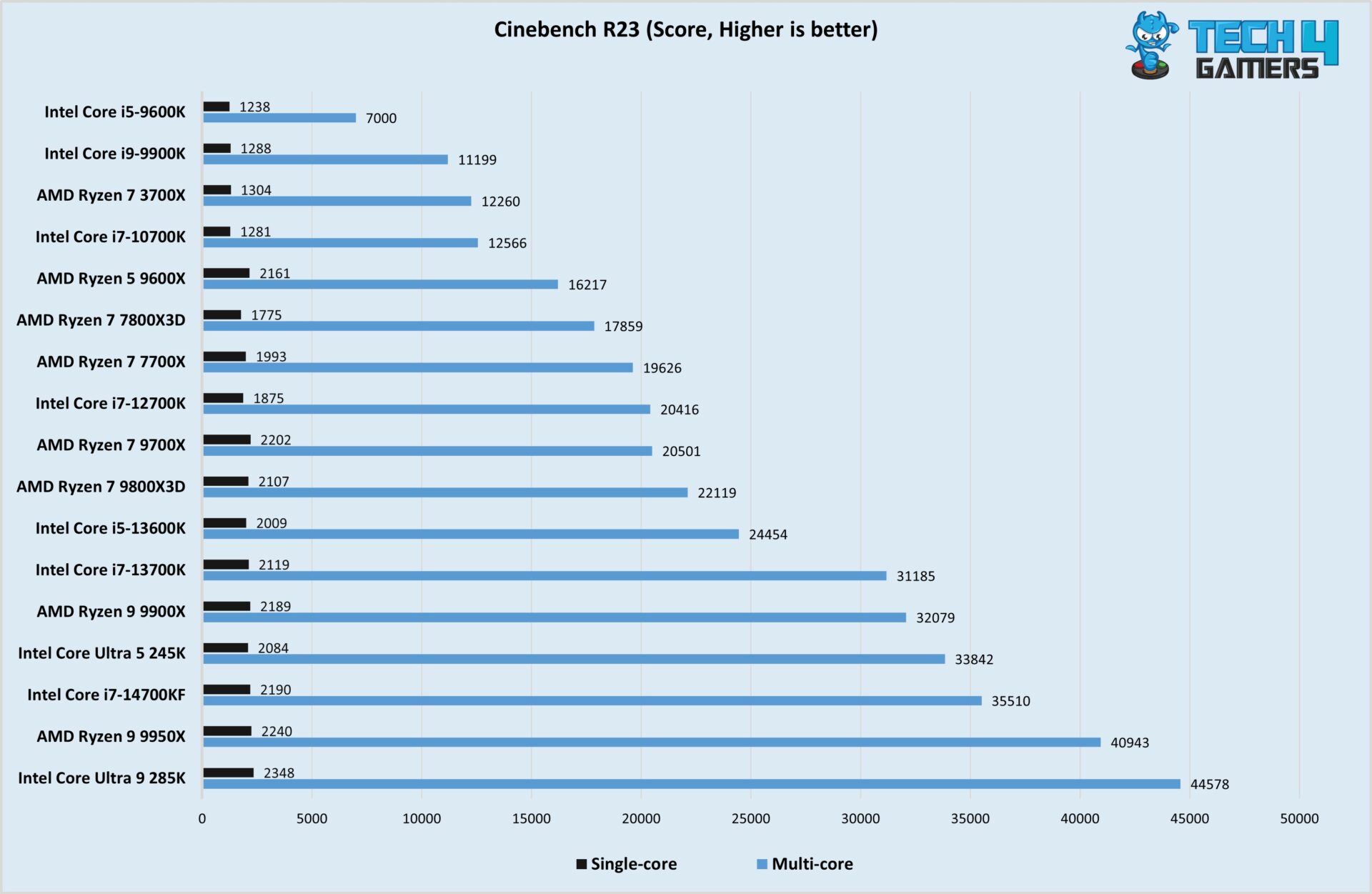
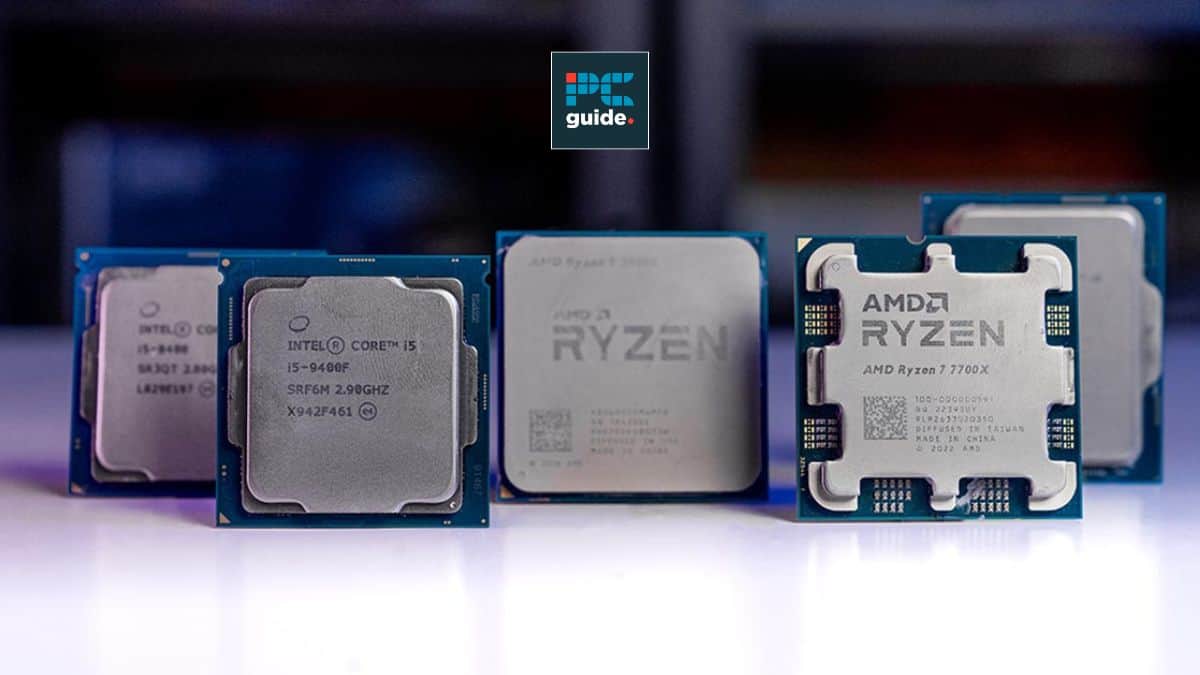

Best Gaming CPU 2026 Gamers Unchained Best Gaming Cpu . Best I5 CPU For Gaming 2026 Top 8 Models Tested Best I5 CPU For Gaming . Best Budget CPUs In 2026 With Gaming Benchmarks Intel Core Ultra 5 245K Cinebench R23 Test Image By Tech4Gamers 1920x1251 . Best CPU For CS2 In 2026 Our Top Picks Tested For Counter Strike 2 Samsung TV Remote Codes Featured Image 29 . Best Gaming CPU Specs 2026 Expert Reviews Guide Featured Image D11xjw5p

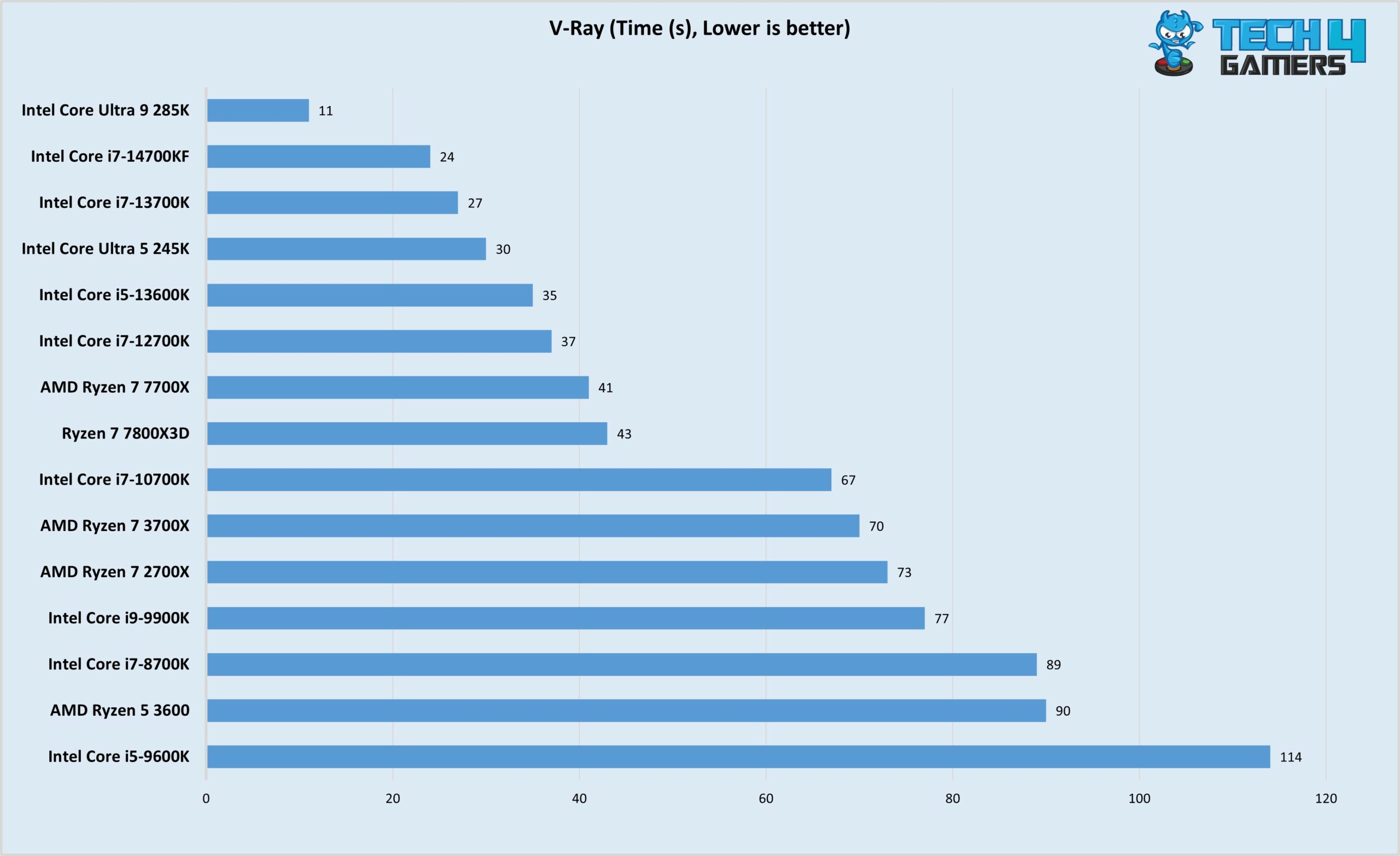


TESTED Best CPU For Gaming In 2026 YouTube . Best PC Gaming CPU 2026 12 Processors Tested PC Gaming CPU . Best Budget CPUs In 2026 With Gaming Benchmarks Intel Core Ultra 5 245K V Ray Test Image By Tech4Gamers Scaled . 8 Best Gaming And Streaming CPU 2026 Reviews Performance Featured Image Zzsnrx91 . Best Gaming CPU 2026 Ryzen 7 9800X3D Vs 9600X Vs Intel Best Gaming Cpu 2026 768x432



8 Best Budget Gaming CPU Combos March 2026 Tested Best Budget Gaming CPU Combos . Best CPU Intel For Gaming Tested And Ranked June 2026 Best CPU Intel For Gaming . 2026 CPU CPU CPU 1796 80 . Best AMD CPU For Gaming And Streaming 2026 Top 8 Zen 5 Processors Ranked Best AMD CPU For Gaming And Streaming 2026 . Best CPU For Streaming And Gaming 2026 Top Picks For Performance Best CPU For Streaming And Gaming

Best CPU For Gaming In 2026 Tested Desktop Laptop Picks Best CPU For Gaming 2.webp. 12 Best AMD CPU For Gaming 2026 Tested Ranked Featured Image Pj0dxlou 300x210 . 12 Best CPU For Gaming March 2026 Processors Tested Ranked Featured Image Q3q6lajs . Best Xeon Processor For Gaming In 2026 YouTube . Best I5 CPU For Gaming 2026 Expert Reviews Comparisons Best I5 CPU For Gaming

AMD Ryzen 7 7800X3D Review June 2026 Complete Guide Best CPU For Gaming PC 1024x559 . Best Processors For Gaming In 2026 For Every Budget Technoid Gaming PC Best Processors For Gaming In 2026 Top Picks For Every Gamer 7de5830b 3b61 4373 82b8. Best Gaming AMD CPU 2026 Expert Reviews Benchmark Tests Featured Image Riqw026n . Get An X3D For Less As One Of AMD S Best Gaming CPUs Hits An All Time . 8 Best CPU For 4K Gaming March 2026 Tested Reviewed Featured Image 59 Oh7ja 300x210


Best Processors For Gaming In 2026 For Every Budget Technoid Gaming PC Building A Mid Range Gaming PC In 2026 Specs And Tips.webp. Best Gaming Processor 2026 AMD Vs Intel Comparison Complete Guide Cpu Gaming Intel. The Best CPUs For 2026 Ultimate Performance Guide 9meters 3021650 Ryzen 9 9900x3d 768x432 . Best Desktop CPUs 2026 Gaming Vs Guide 4 1024x576 . Best CPU For Gaming 2026 Top Gaming Processor The Best CPU For Gaming In 2026 01


10 Best CPU For Gaming 2026 Tested Ranked B0BBJDS62N Customer 3 14 1152x1536 . The Best CPU For Gaming In 2026 Tom S Hardware . 10 Best CPU For 4K Gaming 2026 Expert Reviews Comparisons Featured Image 8sbo85f4 . 12 Best AMD CPU For Gaming 2026 Tested Ranked B09VCJ171S Customer 2 8 946x2048 . Top 10 Best Processor For Gaming PC For 2026 Expert Picks Techzaru Product B0G1ZDN8NC