Navigating the world of PS5 game sharing can seem complex, but this ultimate guide demystifies the process for US gamers. Discover how to effectively share your digital games and PlayStation Plus benefits with friends or family, maximizing your gaming value and expanding your accessible library. For busy adults balancing work and life, game sharing offers an incredible way to enjoy more titles without breaking the bank, a common pain point in today's gaming economy. Learn the simple steps to set up game sharing, understand its benefits and limitations, and troubleshoot common issues. We cover everything from primary console activation to sharing PlayStation Plus, ensuring you and your gaming companions can dive into the latest hits together. This guide focuses on practical, easy-to-follow advice, helping you optimize your PS5 experience and connect with others in the vibrant world of PlayStation gaming. Its an essential read for anyone looking to make their gaming budget go further.
Related gamesHow do I set up game sharing on PS5?
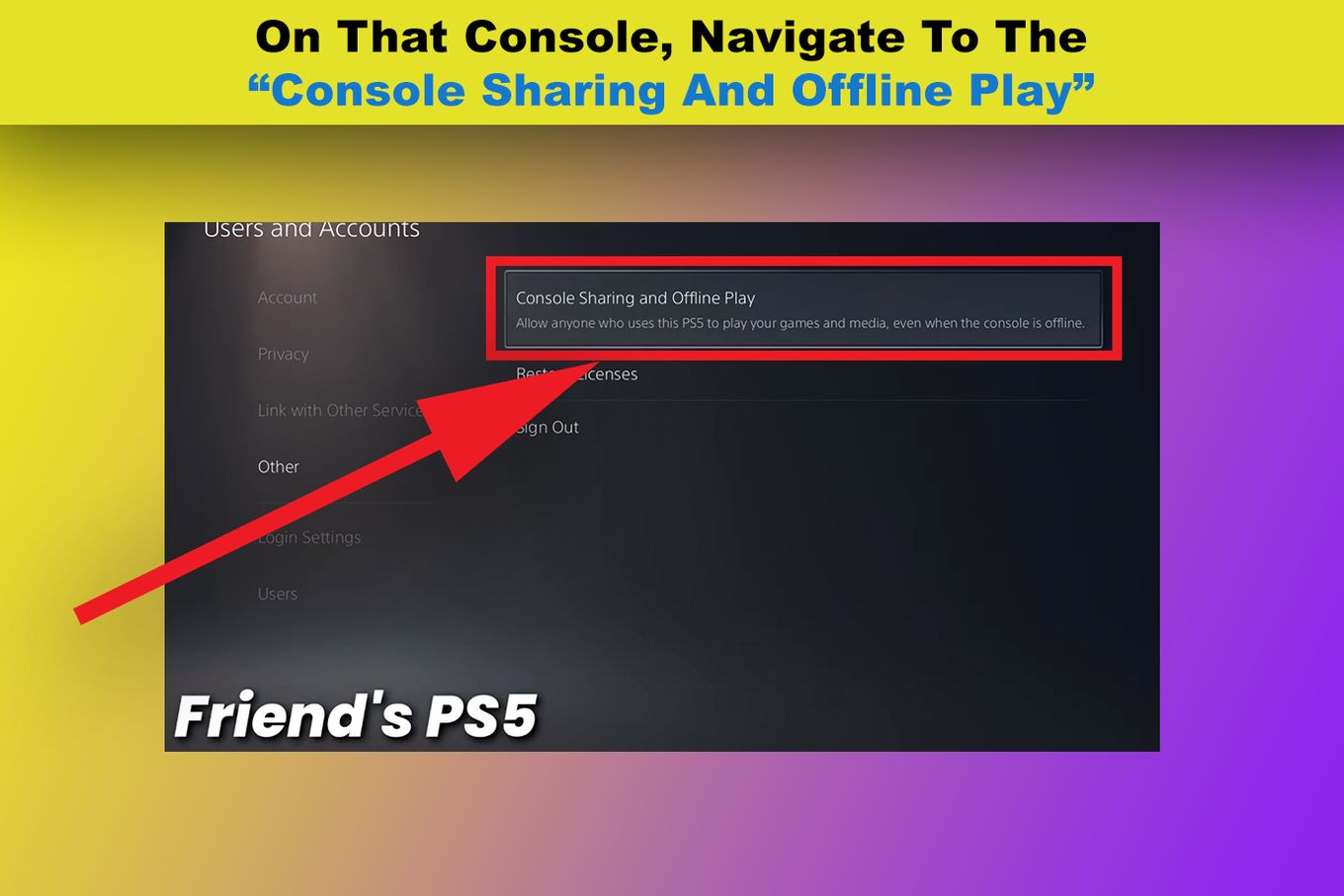
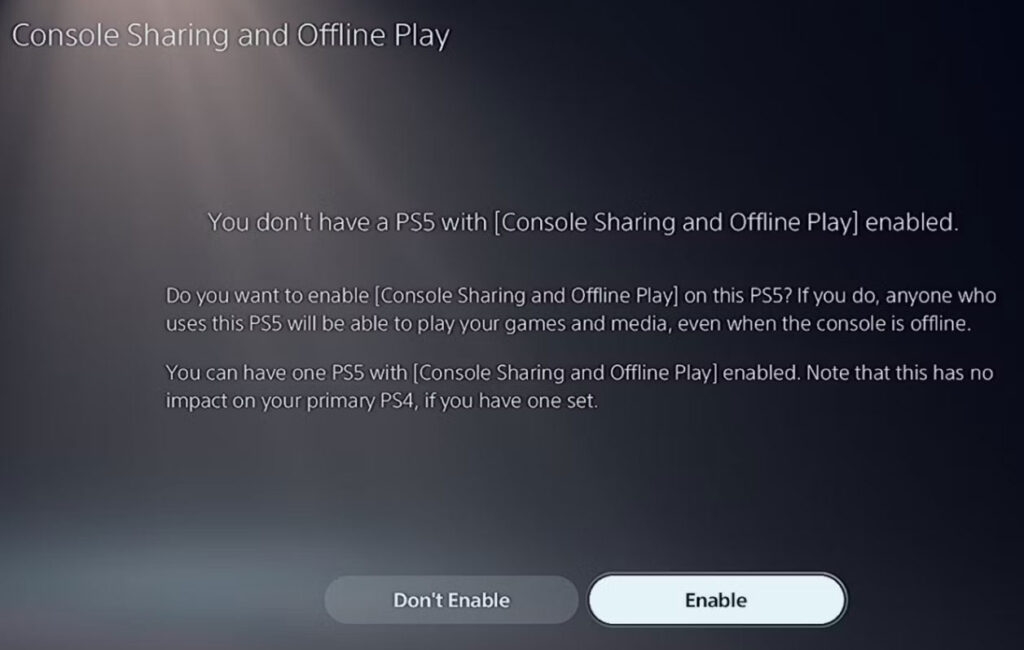
To set up game sharing on PS5, go to the console you want to share games with, log in with your PSN account, then navigate to Settings > Users and Accounts > Other > Console Sharing and Offline Play, and enable it. Your trusted friend will do the same on your console with their account. This allows both players to access each other's digital game libraries and PlayStation Plus benefits.
Can you share PlayStation Plus on PS5?
Yes, you can share PlayStation Plus on PS5. If the account with PS Plus has 'Console Sharing and Offline Play' enabled on a specific PS5, other users on that console can typically access online multiplayer and play games claimed through the monthly PS Plus offerings. This is a fantastic way for families or friends to share the cost of online gaming.
What are the main benefits of PS5 game sharing?
The main benefits of PS5 game sharing include significant cost savings by splitting digital game purchases, instant access to a wider library of games, and shared PlayStation Plus features like online multiplayer. It enhances social gaming experiences and provides flexibility for players to enjoy content without needing the account owner to be logged in.
Is PS5 game sharing safe?
PS5 game sharing can be safe, but it requires caution. You must only game share with someone you implicitly trust, as it involves sharing account login details for setup. Always use strong, unique passwords and enable two-factor authentication (2FA) for added security. Deactivate the 'Console Sharing and Offline Play' feature immediately if you ever end the sharing arrangement or suspect unauthorized access.
Does game sharing work for all PS5 games?
PS5 game sharing works for most digital games purchased from the PlayStation Store. However, it does not apply to physical disc-based games. While downloadable content (DLC) usually shares with the base game, some in-game purchases like virtual currency or specific cosmetic items might be tied to the purchasing account and may not be shareable.
How many people can game share on PS5?
Technically, PS5 game sharing is designed for two consoles at a time. One account can have 'Console Sharing and Offline Play' activated on one PS5 console, enabling another user on that console to access their digital content. The other account can do the same on a second PS5, allowing the first user to access their content. It's an effective two-person system.
What happens if I deactivate 'Console Sharing and Offline Play' on my PS5?
If you deactivate 'Console Sharing and Offline Play' on your PS5, other users on that console will lose access to your digital games and PlayStation Plus benefits when you are not logged in. Also, your own digital games will require an active internet connection to verify licenses if you are playing on that console. Deactivating frees up your account to enable the feature on a different PS5 console.
Are you tired of eyeing that new PS5 release, knowing your friend or family member wants it too, but hesitating at the full price tag? In the bustling lives of today's gamers, where balancing work, family, and personal time is a daily juggle, finding ways to maximize entertainment value is crucial. US gamers, with an average age around 36, often dedicate precious hours each week to unwind, build skills, and connect with friends online. We know that every dollar counts, and enjoying a vast game library without overspending is a significant win. That's where game sharing on PS5 comes in, a fantastic feature that allows you to share digital games and even PlayStation Plus benefits with a trusted friend or family member, effectively doubling your gaming bang for your buck.
This isn't just about saving money; it's about enhancing your social gaming experience, tackling co-op adventures, or simply broadening your horizons with new titles you might not have bought solo. In an era where 87% of US gamers play regularly, often dedicating 10+ hours a week, and social gaming trends continue to soar, game sharing is a smart trick to stay current and connected without the constant financial pressure. Forget the hype and complex jargon; we're here to provide a straightforward guide, just like a trusted friend would, to help you navigate the ins and outs of PS5 game sharing, solve common pain points, and get back to what truly matters: enjoying your games.
What Exactly Is Game Sharing on PS5?
Game sharing on PS5 allows two PlayStation Network accounts to access each other's digital game libraries and PlayStation Plus subscription benefits. The core mechanism revolves around designating one PS5 console as your 'Console Sharing and Offline Play' console, formerly known as your 'Primary PS4.' When your console is set this way, anyone who logs into that specific PS5 can play your digital games and utilize your PlayStation Plus features, even when you're not logged in yourself or are playing on a different console.
This means if you buy a digital game, your designated friend can play it on their console, and vice-versa. It’s a completely legitimate feature provided by Sony, designed to offer flexibility for households with multiple consoles or close gaming partners. It significantly reduces the financial burden, especially for new AAA titles that can cost upwards of 70 dollars, making it a valuable tool for budget-conscious gamers.
How Do You Activate Game Sharing on PS5?
Activating game sharing on the PS5 is a relatively simple process that involves two consoles. It requires a mutual agreement and trust between the two individuals sharing accounts, as you will be exchanging login credentials temporarily. Here’s a step-by-step breakdown:
Step 1: On Your Friend's PS5 (or Second Console):
- Log in to your PlayStation Network account on your friend’s PS5 console. This is the console where you want your digital games and PS Plus benefits to be accessible.
- Once logged in, navigate to Settings.
- Select 'Users and Accounts'.
- Choose 'Other'.
- Select 'Console Sharing and Offline Play'.
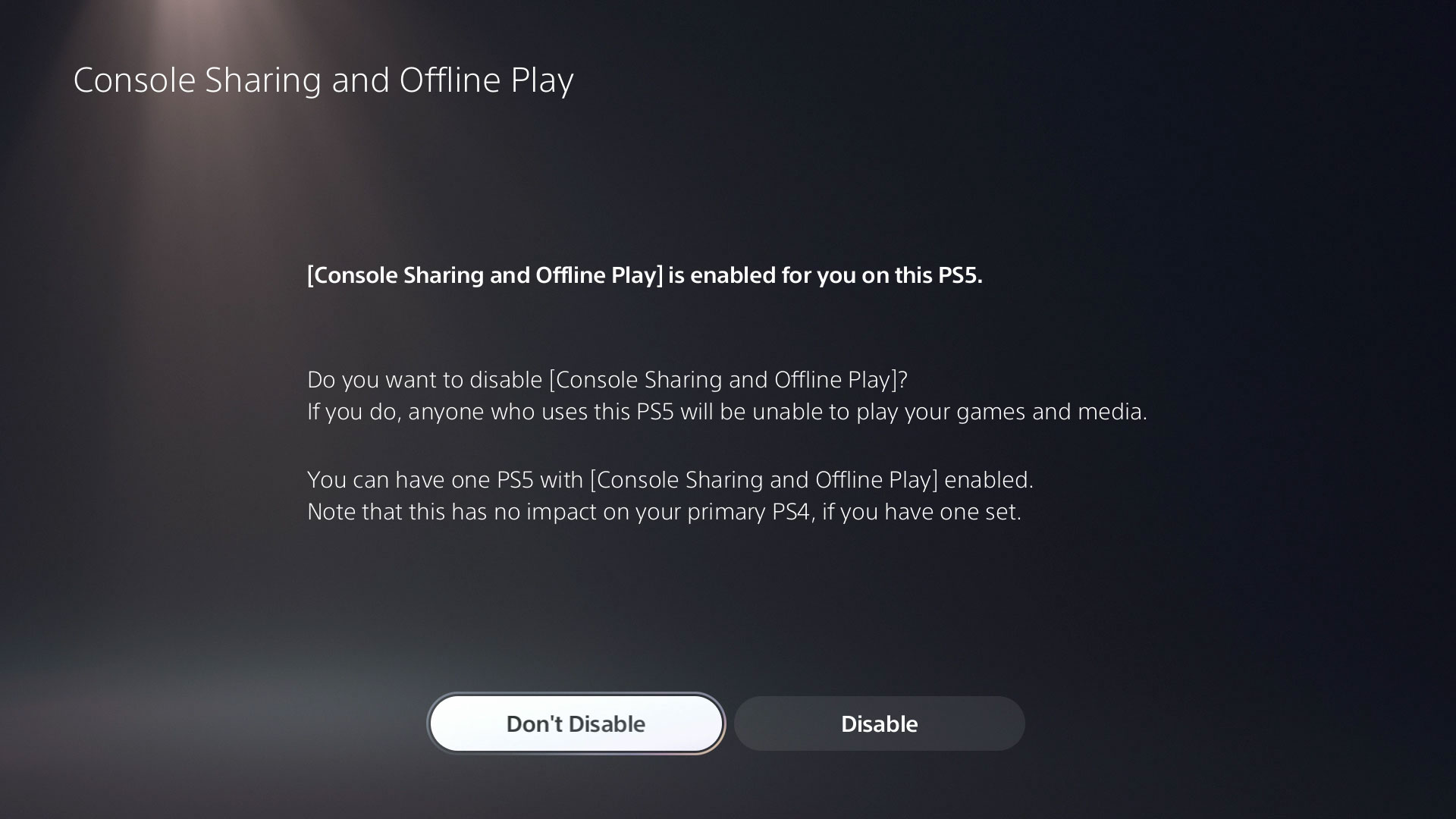
- Enable this feature. This designates your account's 'home' to this specific PS5 console, allowing others on that console to access your content.
Step 2: On Your Own PS5 (or Primary Console):
- Your friend will need to log in to their PlayStation Network account on your PS5 console.
- Follow the same steps: Go to 'Settings' > 'Users and Accounts' > 'Other' > 'Console Sharing and Offline Play'.
- Enable this feature for your friend's account on your console.
Once both consoles have completed these steps, you will effectively be game sharing. You can then log out of each other's accounts on the respective consoles, leaving the shared benefits active. Remember, you can only have 'Console Sharing and Offline Play' enabled on one PS5 at a time per account. This method allows each person to play games from the other's library, even if the other person is offline or playing a different game.
What Are the Benefits of PS5 Game Sharing?
The advantages of PS5 game sharing are substantial, especially for gamers looking to optimize their spending and enhance their social gaming experiences:
- Cost Savings: This is arguably the biggest benefit. By sharing, you and your partner can split the cost of digital games, effectively halving the price for each title. This is a game-changer for new releases, allowing you to access more games for the same budget.
- Expanded Game Library: You instantly gain access to your partner's entire digital game library, and they gain access to yours. This dramatically increases the number of games available to you, providing more options for solo play, co-op, or just trying something new without extra purchases.
- PlayStation Plus Benefits: If one of you has a PlayStation Plus subscription (Essential, Extra, or Premium), the other person on the designated console can also enjoy its benefits. This includes online multiplayer access, monthly free games, and discounts. This is particularly valuable as online multiplayer is a cornerstone of modern gaming, with many US gamers engaging in social and competitive play for hours weekly.
- Flexibility and Convenience: You can play shared games without the account owner needing to be logged in, as long as the 'Console Sharing and Offline Play' setting is active. This offers tremendous flexibility for playing at different times or even when one person is offline.
- Shared Experiences: Game sharing fosters a sense of community and allows you to experience games together. Whether it's discussing a story-driven single-player title or planning your next co-op session, it strengthens gaming bonds.
Are There Any Limitations to PS5 Game Sharing?
While PS5 game sharing is incredibly beneficial, it does come with a few limitations that gamers should be aware of:
- Digital Games Only: Game sharing strictly applies to digital games purchased through the PlayStation Store. Physical disc-based games cannot be shared in this manner, as they require the disc to be present in the console.
- One Console Sharing Per Account: Each PlayStation Network account can only have 'Console Sharing and Offline Play' activated on one PS5 console at a time. If you activate it on a new console, it will automatically deactivate it on the previous one.
- PlayStation Plus Tiers: While core PS Plus benefits like online multiplayer and monthly free games are generally shared, some higher-tier benefits might be limited to the subscribing account. For instance, the game catalog for PS Plus Extra/Premium subscribers is primarily accessible to the account that owns the subscription, though games downloaded from it might be playable by the other user.
- DLC and In-Game Purchases: Downloadable Content (DLC) usually shares with the base game. However, in-game purchases (like V-Bucks, cosmetic items, or season passes bought within a game) are often tied to the purchasing account and may not always transfer to the other user, depending on the game's developer.
- Trust and Security: Since you need to exchange login credentials to set up game sharing, it necessitates a high level of trust. Sharing account details always carries a minor risk, so it's vital to only game share with someone you implicitly trust and to ensure strong, unique passwords are used.
Can I Game Share PlayStation Plus?
Yes, absolutely! Game sharing on PS5 extends to many aspects of your PlayStation Plus subscription, which is a huge bonus for saving money and enjoying online features. If one person has an active PlayStation Plus subscription, the other person on the 'Console Sharing and Offline Play' enabled console can typically access several key benefits:
- Online Multiplayer: This is perhaps the most significant shared benefit. The non-subscribing user can play online multiplayer games using the PS Plus subscription of the account owner. This is crucial for staying connected with friends in popular titles, a core aspect of social gaming in 2026.
- Monthly Free Games: Any games claimed from the monthly PS Plus offering by the subscriber can often be downloaded and played by the non-subscribing user, as long as the 'Console Sharing and Offline Play' feature is active on their console.
- Game Catalog (PS Plus Extra/Premium): While the entire Game Catalog is primarily linked to the subscriber's account, games downloaded from this catalog by the subscribing user can typically be played by the non-subscribing user on the 'Console Sharing and Offline Play' enabled console. However, directly browsing and adding games from the catalog might require the subscriber's account.
- Discounts: Special PS Plus discounts on the PlayStation Store are generally tied to the subscribing account. The non-subscribing user might not see these discounts directly unless they are logged into the subscriber's account.
This makes sharing a PlayStation Plus subscription an excellent strategy for households or close friends, providing significant value for money in accessing a broader range of games and essential online functionalities.
How to Safely Game Share with a Friend?
Safety is paramount when game sharing, as it involves exchanging sensitive account information. Here are key steps to ensure a secure and smooth game sharing experience:
- Choose a Trusted Partner: Only game share with someone you know and trust implicitly, like a family member or a very close friend. Avoid sharing credentials with strangers or acquaintances.
- Use Strong, Unique Passwords: Before sharing, ensure your PlayStation Network account has a strong, unique password that isn't used for any other online service. This minimizes the risk if your credentials are ever compromised elsewhere.
- Enable Two-Factor Authentication (2FA): This is a crucial security layer. Activate 2FA on your PlayStation Network account. This requires a code from your mobile device in addition to your password, making it much harder for unauthorized access. Inform your friend that they might need this code from you during the initial login.
- Only Share for Setup: You only need to share your login details for the initial setup of 'Console Sharing and Offline Play' on your friend's console. Once activated, you can both log out of each other's accounts and simply play on your respective PSN profiles.
- Deactivate When Done: If your game sharing arrangement ends or you suspect any security issues, immediately deactivate 'Console Sharing and Offline Play' from your account settings on the console where it was enabled. You can also remotely deactivate all devices linked to your account via the PlayStation website.
- Monitor Account Activity: Periodically check your PlayStation Network transaction history and login activity to ensure everything looks normal.
By following these precautions, you can enjoy the benefits of game sharing with peace of mind, knowing your account is as secure as possible.
What Happens If I Deactivate My Primary PS5?
Deactivating your PS5 as the 'Console Sharing and Offline Play' console (previously 'Primary PS4') has several important implications that you need to understand:
- Loss of Shared Content: Any digital games you own, along with your PlayStation Plus benefits, will no longer be accessible to other users on that specific console when you are not logged in. This means your friend will lose access to your shared library.
- Online Requirement for Your Games: If you are playing on that deactivated console, your digital games will now require you to be logged into your PlayStation Network account and for the console to have an active internet connection to verify game licenses. If you go offline, you won't be able to play your digital games.
- Regaining Offline Play: To regain offline play for your own digital games, you would need to reactivate 'Console Sharing and Offline Play' on that specific console or always remain online while playing.
- Ability to Activate Elsewhere: Deactivating allows you to set another PS5 console as your 'Console Sharing and Offline Play' console. This is essential if you get a new PS5, sell your old one, or want to switch your game sharing partner.
- Remote Deactivation: If you no longer have access to the console (e.g., you sold it), you can remotely deactivate all devices linked to your account via the PlayStation website once every six months. This is a crucial security feature.
Understanding these consequences helps you manage your game sharing setup effectively and securely, ensuring you retain control over your digital content.
Troubleshooting Common Game Share Issues on PS5
Even with a straightforward process, you might encounter a few snags when setting up or using PS5 game sharing. Here’s how to troubleshoot some common problems:
- Games Not Showing Up: If shared games aren't appearing in your library, ensure that 'Console Sharing and Offline Play' is correctly enabled on the console you're using for the *other person's* account. Double-check that both accounts are signed in at least once and that the games are indeed digital titles. Sometimes, simply restarting the console or rebuilding the database (Settings > System > System Software > Restore Default Settings > Rebuild Database) can resolve display issues.
-
PS5 Game Share involves setting a console as your Primary PS5. Only digital games and PlayStation Plus benefits can be shared. Game sharing typically works best between two consoles. It offers significant cost savings for digital game libraries. Account security is paramount when sharing login details. Deactivating a console as primary is crucial for security. Shared games are accessible without the owner logged in.
35#1 Gallery can you game share on ps5


How To Refund A PS5 Game PlatPrices PlatPrices How To Game Share On Ps5 Gen. How To Gameshare On PS5 2024 Guide Alvaro Trigo S Blog Friend Console Sharing Menu . Share Your PS5 Games With Friends A Step By Step Guide YouTube . How To Game Share On PlayStation 5 Expand Library 2024 How To Game Share On Ps5 . How To Game Share On PS5 PS5 Game Share Easy Method YouTube
#2 Gallery can you game share on ps5


How To Share Play On PS5 With A Friend Best Tutorial YouTube . PlayStation Teases 2026 PS5 Games In New Trailer Push Square Large . Best PS5 Games In 2026 Top Picks You Shouldn T Miss Innovate And Explore Best PS5 Games In 2026 You Must Play . PS5 Game Sharing And How To Assign A Primary PS5 Console GamesRadar . Ps5 Game Sharing Gu A Completa GDXGQ Ps4 Ps5 Game Sharing Thumbnail
#3 Gallery can you game share on ps5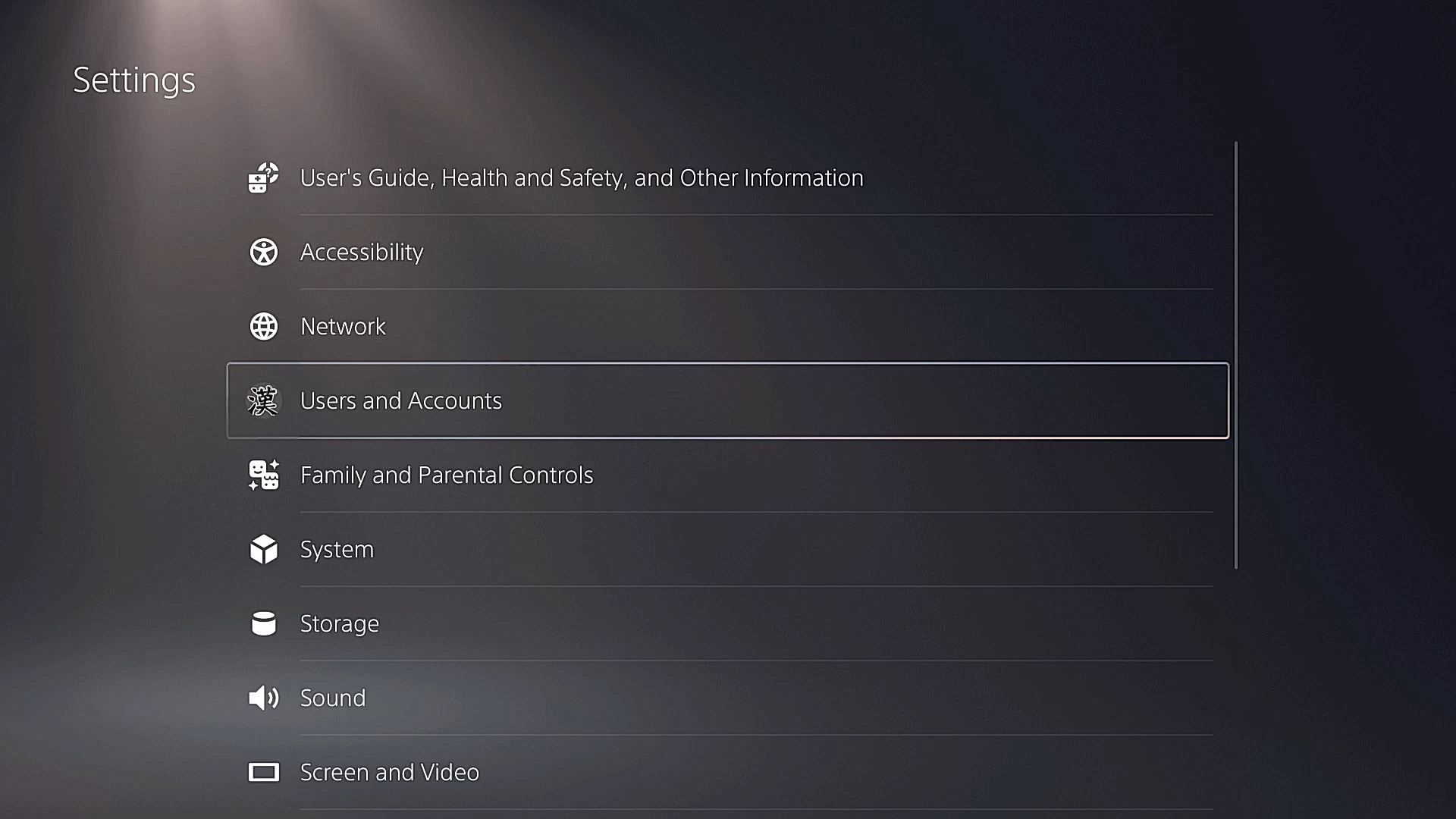


How To Game Share Console Share And Set A Primary PS5 On PS5 How To Game Share Console Share And Set A Primary Ps5 On Ps5 3 . How To Gameshare On PS5 2024 Guide Alvaro Trigo S Blog How To Gameshare Ps5 . How To Gameshare On PS5 Explained The Nerd Stash Spiderman 2 Playstation 5 860x484 . How To Share Games On PS5 Enabling Console Sharing YouTube . How To Gameshare On PS5 With Friends Step By Step Game Sharing Ps4 Ps5
#4 Gallery can you game share on ps5

How To Game Share On PS4 And PS5 And How To Get The PS Plus . How To Game Share On PS5 Easy To Follow Ps5 Game Sharing 1024x585 . How To Share PS5 Games With Family And Friends PlayStation LifeStyle How To Share PS5 Games With Family And Friends . How To Gameshare On PS5 TechLatest Enable 4 1024x650 . How To Enable Game Sharing On PS5 Complete Step By Step Guide 2025 How To Enable Game Sharing On Ps 5
#5 Gallery can you game share on ps5



How To Gameshare On PS5 TechLatest How To GameShare On PS5 768x432 . How To Game Share On A PS5 Lifehacker Images 1.fill.size . Top 10 Most Anticipated PS5 Games In 2026. PS5 Game Sharing Console Sharing And Offline Play In 6 Min PS5 Game Sharing In 6 Minute Read.webp. PS5 Pro Vs PS5 Why 2026 Is A Great Time To Upgrade PS5 Pro PS5 2026 Great Time Upgrade Main
#6 Gallery can you game share on ps5



How To Share Your Games With Other Accounts On PS5 Console Family . How To Share Play PS5 Games With PS4 Users Tutorial Cross Generation . How To Link PS5 With Friends Console Sharing Game Share Explained . How To GameShare On PS5 2026 YouTube . 40 PS5 Games To Play In 2026 Push Square Large
#7 Gallery can you game share on ps5



How To GameShare On PS5 PlayStation Console Sharing How Gameshare On Ps5. How To Setup PS5 Game Sharing Dexerto Ps5 Game Sharing Featured . How To Game Share On PS5 Easy Guide YouTube . How To Game Share On PS5 Easy To Follow PS5 Game Sharing Feature 1024x585 . How To Game Share On PS5 Easy To Follow Game Sharing PS5 1024x585